Automated 4K wallpaper rotator with battery-aware engine
Wallpaper Rotator from TheWizard automates wallpaper changes on Android devices, updating Home and Lock screens without manual switching. It cycles 4K and Ultra HD images at configurable intervals, mixes curated library content with local galleries, and applies smart scaling plus an instant preview before applying wallpapers. The app includes a battery-optimized background engine, Wi‑Fi Only downloads, AMOLED dark mode, and custom playlists. Suited to Android users who want rotating high-resolution art and control over battery and data use.
How broad is the app's curated library and local integration?
Beyond basic rotation, the app supplies a hand-picked 4K and Ultra HD library that spans categories such as Nature, AMOLED, Architecture, Anime, Cyberpunk, and Minimalist. It also lets users combine those selections with local photos by creating custom playlists or pointing at specific folders. The mixed source model keeps curated artwork and personal galleries in the same rotation pool without manual import for each image.
How granular is control over rotation intervals and image fitting?
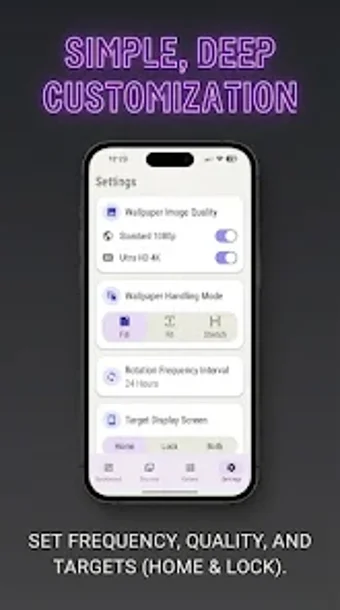
The app exposes interval presets and manual timing so users pick how often backgrounds change, including short options and daily cycles. Smart automatic scaling and cropping adjust framing for standard phones, foldables, and tablets to reduce manual edits. A one-tap preview shows icons and the clock overlay before applying, and playlist management lets users prioritize folders or individual images for tighter control.
Does Wallpaper Rotator affect battery life or mobile data?
Wallpaper Rotator uses a background engine designed to minimize power use and applies Android background management to keep transitions efficient. A Wi‑Fi Only mode prevents cellular downloads of high-resolution backgrounds, and AMOLED dark mode offers deep-black images that reduce power draw on compatible screens. Those measures aim to lower both battery and data impact compared with naive download-and-apply approaches.
Is setup and daily use approachable for typical Android users?
The app presents a clean Material Design interface and a quick apply/preview workflow that reduces configuration time for most users. Folder selection and playlist creation occur inside the app, and the developer designed it as a lightweight solution according to early user notes about interface clarity. Support for multiple form factors means setup rarely requires manual cropping on different devices.
A practical choice for rotating high-resolution wallpapers
The app suits Android users who want frequent wallpaper variety and per-image framing across phones, tablets, and foldables. Its design targets people who value curated 4K content and controls over downloads. Users who prefer a static background or who avoid background services entirely should weigh whether an automated rotation engine matches their workflow.